
Ford Escape 2020-2026 Service Manual / Body and Paint / Frame and Mounting
Ford Escape: Body and Paint / Frame and Mounting
 General Procedures - Paintwork Defects and Damage
Materials
Name
Specification
Motorcraft® Acid NeutralizerZC-1-A
-
Motorcraft® Alkaline NeutralizerZC-2-A
-
Repair
NOTE:
Refinishing - Environmental Damage
WARNING:
Before beginning any service procedure in this
manual, refer to health and safety warnings in section 100-00 General
Information...

Other information:
Ford Escape 2020-2026 Owners Manual: Exterior Lamps
Switching the Turn Signal Lamps On and Off Push the lever up or down to switch the turn signal lamps on. Set the lever to the middle position to switch the turn signal lamps off. Note: Tap the lever up or down to make the turn signal lamps flash three times. Switching the Daytime Running Lamps On and Off - Vehicles With: Daytime Running Lamps (DRL) WARNING: The daytime running lamps system ..
Ford Escape 2020-2026 Owners Manual: Side Parking Aid - Vehicles With: Active Park Assist
What is the Side Parking Aid The front and rear outermost parking aid sensors map objects that are near to the sides of your vehicle. Side Parking Aid Limitations The sensor coverage is up to 24 in (60 cm) from the sides of your vehicle. The side parking aid may not function if: You switch your vehicle on, off and back on within a few seconds. Your vehicle remains stationary for over two..
Categories
- Manuals Home
- 4th Generation Ford Escape Owners Manual
- 4th Generation Ford Escape Service Manual
- Drive Modes
- What Is the Tire Pressure Monitoring System. Tire Pressure Monitoring System Overview
- Removal and Installation - All-Wheel Drive (AWD) Module - 1.5L EcoBoost (132kW/180PS) – I3 (Y1)/2.0L EcoBoost (177kW/240PS) – MI4
- New on site
- Most important about car
Sitting in the Correct Position
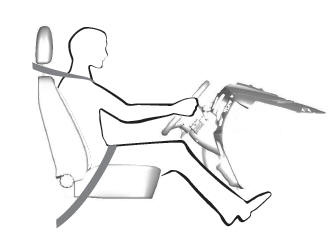
When you use them properly, the seat, head restraint, seatbelt and airbags will provide optimum protection in the event of a crash.

Copyright © 2026 www.fordescape4.com