
Ford Escape 2020-2026 Owners Manual / Vehicle Wi-Fi Hotspot / Changing the Vehicle Wi-Fi Hotspot Name or Password
Ford Escape: Vehicle Wi-Fi Hotspot / Changing the Vehicle Wi-Fi Hotspot Name or Password
 Press the button to enter the
settings menu.
Press the button to enter the
settings menu.
- Select Connectivity Features.
- Select Vehicle Hotspot.
- Select Settings.
- Select SSID: ___.
- Enter your required SSID.
- Select Done.
- Select Password: ___.
- Enter your required password.
- Select Done.
 Creating a Vehicle Wi-Fi Hotspot
You can create a Wi-Fi hotspot in your
vehicle and allow devices to connect to it
for access to the Internet.
Press the button to enter the
settings menu...
 Audio System
..
Other information:
Ford Escape 2020-2026 Owners Manual: Rollover Warning. The Better Business Bureau Auto Line Program
Rollover Warning WARNING: Utility vehicles have a significantly higher rollover rate than other types of vehicles. WARNING: Vehicles with a higher center of gravity (utility and four-wheel drive vehicles) handle differently than vehicles with a lower center of gravity (passenger cars). Avoid sharp turns, excessive speed and abrupt steering in these vehicles. Failure to drive cautiously in..
Ford Escape 2020-2026 Service Manual: General Procedures - Quick Release Coupling
Disconnect NOTICE: When reusing liquid or vapor tube connections, make sure to use compressed air to remove any foreign material from the connector retaining clip area before separating from the tube or damage to the tube or connector retaining clip may occur. NOTICE: Fuel injection equipment is manufactured to very precise tolerances and fine clearances. It is essential that absolu..
Categories
- Manuals Home
- 4th Generation Ford Escape Owners Manual
- 4th Generation Ford Escape Service Manual
- Child Safety Locks
- Opening and Closing the Hood
- General Procedures - Brake Service Mode Activation and Deactivation
- New on site
- Most important about car
Sitting in the Correct Position
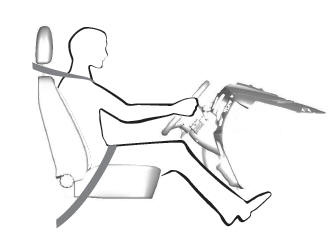
When you use them properly, the seat, head restraint, seatbelt and airbags will provide optimum protection in the event of a crash.

Copyright © 2026 www.fordescape4.com